

You built a website, paid for design, and waited for customers to come. They didn’t. This is the quiet frustration behind a number that most web designers won’t tell you: 90% of small business websites fail because they prioritize how they look over what they actually do. The reasons for website failure go far deeper than bad fonts or outdated photos. This article breaks down the real causes, from UX mistakes and strategic blind spots to technical failures most owners never see coming, and shows you exactly what to do about each one.
Table of Contents
- Key takeaways
- Why small business websites fail at the UX level
- Strategic and content mistakes that limit your reach
- Technical and operational failures most owners never see
- The AI design trap and trend-driven pitfalls
- How to diagnose and fix a failing website
- My honest take on why so many sites silently fail
- How Desadigit helps you build a site that actually works
- FAQ
Key takeaways
| Point | Details |
|---|---|
| Strategy beats aesthetics | A beautiful site that lacks clear goals and conversion paths will consistently underperform a simpler, well-structured one. |
| Mobile is non-negotiable | With most traffic coming from phones, a site that isn’t mobile-friendly loses the majority of its potential visitors. |
| Technical failures are silent killers | Downtime, expired SSL certificates, and DNS errors can make your site invisible without any warning signs you’d notice. |
| AI design needs human judgment | AI tools speed up site creation but produce generic results without a clear brand strategy guiding the output. |
| Auditing is the starting point | You cannot fix what you haven’t measured. A structured website audit reveals the highest-priority problems first. |
Why small business websites fail at the UX level
The first place most small business websites lose visitors is in the first few seconds. A visitor lands on your page, reads a vague headline like “Welcome to Our Business,” and immediately clicks back. Nearly 50% of visitors leave a site without scrolling when the messaging in the hero section is unclear. That’s half your traffic gone before they even see what you offer.
Here are the most common UX mistakes that cause this kind of early exit:
- Unclear messaging. Your homepage headline should answer one question in under five seconds: “What do you do and who is it for?” If it doesn’t, visitors leave.
- No visible call-to-action. Every page needs to guide visitors toward a next step. “Book a call,” “Get a free quote,” or “Shop now” should be impossible to miss.
- Poor mobile experience. 60% of global web traffic comes from mobile devices, yet many small business sites still display broken layouts or tiny text on phones.
- Slow load times. Every second of delay in page load time reduces conversions by approximately 7%. A three-second delay can cut your leads by more than 20%.
- Missing trust signals. Visitors need proof before they act. Customer reviews, money-back guarantees, and testimonials all reduce hesitation and build credibility quickly.
Pro Tip: Test your own site on a real smartphone, not just a browser preview. Tap every button, fill out every form, and read every page as if you’ve never seen it before. You’ll find problems within minutes.
The good news is that most of these issues are fixable without rebuilding from scratch. Clearer copy, a prominent button, and a compressed image library can transform a site’s performance without touching the underlying design.
Strategic and content mistakes that limit your reach
Most small business owners build websites the wrong way around. They start with what they want to say, not what their customers need to hear. The result is a site that functions more like a personal portfolio than a tool designed to generate leads or sales.
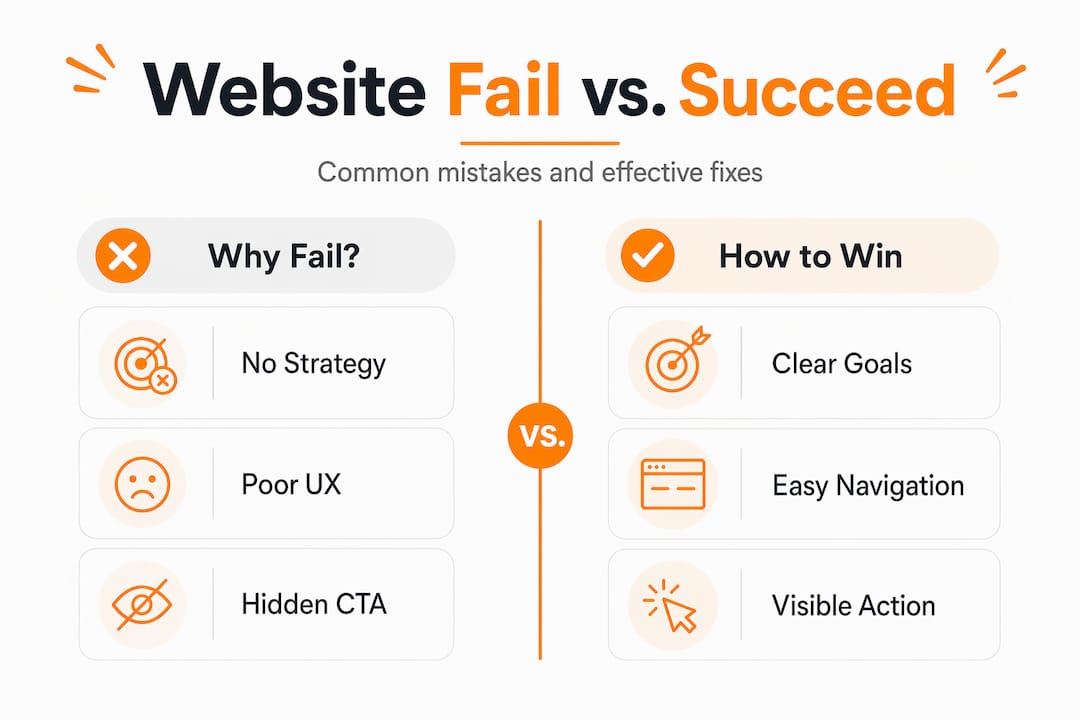
Websites should be treated as solution tools guiding customers through a clear conversion path, not as static brochures. That distinction changes everything about how you write, organize, and update your content.
The most damaging strategic mistakes include:
- No defined objective. If you can’t answer “What do I want visitors to do when they land here?”, your site has no direction. Every page should serve a specific purpose tied to a business goal.
- Trying to appeal to everyone. A plumber who also does electrical work and handyman services on the same homepage confuses visitors and weakens SEO. Focused sites convert better.
- Ignoring SEO fundamentals. Page titles, meta descriptions, header tags, and keyword-optimized content are not optional extras. They are how Google decides whether to show your site to anyone at all.
- No content updates. Google rewards fresh, relevant content. A site that hasn’t been updated in two years signals to both visitors and search engines that the business may not be active.
Around 45% of small businesses lack a dedicated strategy document, which leads to inconsistent content and an ineffective digital presence. Small business owners often lack an executable strategy, posting content and building pages without clear goals or a defined audience. The fix isn’t more content. It’s a clear plan that connects every page to a specific customer need and business outcome.
Technical and operational failures most owners never see
This is the category that surprises most small business owners. Your site can look great, load fast, and have perfect messaging, and still fail completely because of problems happening in the background.

Consider these statistics:
| Cause of downtime | Share of incidents |
|---|---|
| Server and hosting failures | ~40% |
| Human deployment errors | ~25% |
| DNS misconfigurations | Significant but underestimated |
| SSL certificate expirations | Often undetected until visitor loss |
About 40% of website downtime is caused by server and hosting failures, while human errors during deployments account for roughly 25% of incidents. These are not rare events. They happen to small business websites regularly, and most owners find out only when a customer calls to say the site is down.
Here are the four technical failure points you need to monitor:
- Hosting reliability. Cheap shared hosting often comes with poor uptime guarantees. If your host goes down, so does your business. Look for hosts that offer at least 99.9% uptime.
- DNS configuration. DNS issues, including expired domains, can make your site completely unreachable. Visitors see an error page that looks identical to a server crash, and they don’t come back.
- SSL certificate expiration. Expired SSL certificates trigger browser security warnings that block 99% of visitors. Most people will not click past a “Your connection is not private” warning.
- Monitoring beyond the homepage. Many small business owners only check if their homepage is live, missing outages on contact pages, booking forms, and checkout pages where conversions actually happen.
Pro Tip: Set up a free uptime monitoring tool like UptimeRobot. Point it at your homepage, your contact page, and your most important service page. You’ll get an email the moment any of them go down.
The AI design trap and trend-driven pitfalls
AI website builders have made it faster than ever to launch a site. That speed comes with a real cost, though. Over-reliance on AI-generated website design produces generic, unoriginal sites that share the same layouts, stock images, and interaction patterns as thousands of other businesses.
Here’s a quick comparison of what separates a strategic site from a trend-driven one:
| Strategic website | Trend-driven website |
|---|---|
| Built around customer questions | Built around what looks modern |
| Consistent brand voice and visuals | Generic templates with swapped logos |
| Clear CTAs tied to business goals | Animations and effects with no purpose |
| Tested on real users | Launched based on designer preference |
| Updated based on performance data | Updated when the owner feels like it |
Beyond generic design, trendy interaction elements like scroll hijacking, excessive animations, and auto-playing video create friction rather than delight. Visitors don’t know where to click, the page feels slow, and they leave.
Although AI facilitates website creation, without human judgment and a clear brand strategy it consistently produces ineffective sites. The tool is only as good as the strategy behind it. If you use an AI builder, treat the output as a starting draft, not a finished product. Review every page for clarity, brand alignment, and conversion logic before you publish.
How to diagnose and fix a failing website
You don’t need to guess what’s wrong with your site. A structured audit tells you exactly where to focus your time and money. Here’s a practical process to follow:
- Run a speed test. Use Google PageSpeed Insights to check your load time on both mobile and desktop. Anything below a score of 70 on mobile needs attention.
- Check your SEO basics. Use a free tool like Google Search Console to see which pages are indexed, which keywords bring traffic, and which pages have errors.
- Review your messaging. Read your homepage headline out loud. If a stranger wouldn’t understand what you do in five seconds, rewrite it.
- Test every form and button. Submit your contact form, click your phone number link, and test your booking tool if you have one. Broken forms are one of the most common website mistakes that go unnoticed for months.
- Check your SSL and domain expiration. Log into your domain registrar and hosting account. Confirm both your domain and SSL certificate are renewed well in advance.
- Set up uptime monitoring. As mentioned above, free tools exist to alert you the moment your site goes down.
Pro Tip: Prioritize fixes based on where visitors drop off, not based on what bothers you visually. Use Google Analytics or Microsoft Clarity to see which pages have the highest exit rates. Start there.
If the audit reveals deep structural problems, such as a site built on an outdated platform, missing mobile responsiveness, or no SEO foundation at all, a redesign is often more cost-effective than patching individual issues. Knowing when to rebuild versus when to repair is one of the most valuable decisions you can make for your business.
My honest take on why so many sites silently fail
I’ve worked with enough small business owners to recognize a pattern. The site gets built, the owner is proud of how it looks, and then nothing happens. No calls, no form submissions, no sales. Six months later, they’re wondering if websites even work anymore.
The real problem isn’t the website. It’s the mindset behind it. Most small business owners treat their website as a one-time project rather than a virtual salesperson working around the clock. They wouldn’t hire an employee and then never train them, never update their materials, and never check how they’re performing. But that’s exactly how most websites are managed.
What I’ve found actually works is simple: treat every page as a conversation with your best potential customer. Ask yourself what question that customer is trying to answer, and make sure your page answers it clearly, quickly, and with a logical next step. That single shift in thinking fixes more problems than any design trend or AI tool ever will.
The businesses I’ve seen turn their websites around didn’t necessarily spend more money. They got clearer on their goals, fixed the technical basics, and started measuring what mattered. Your website is either working for you or against you. There’s rarely a neutral middle ground.
— Matthew
How Desadigit helps you build a site that actually works
If this article has you looking at your own site with fresh eyes, you’re not alone. Many small business owners in Olympia and beyond reach out to Desadigit after realizing their current site isn’t generating the results they need.

Desadigit specializes in small business website design that goes beyond aesthetics. Every site is built with clear messaging, mobile optimization, and technical reliability from the start. Whether you need a full redesign or targeted improvements, the team focuses on turning your site into a tool that brings in real customers. Explore Desadigit’s small business solutions to see how affordable, strategy-first web design can change what your website does for you every single day.
FAQ
Why do most small business websites fail to get results?
90% of small business websites fail because they prioritize design over strategy, lacking clear messaging, strong calls-to-action, and a defined conversion path for visitors.
How does slow loading speed affect my website’s performance?
Every second of delay reduces conversions by approximately 7%, meaning a three-second load time can cost you more than 20% of potential leads before visitors even read your content.
What technical issues can make a website fail without warning?
Expired SSL certificates, DNS misconfigurations, and hosting outages are the most common silent killers. Expired SSL certificates alone trigger security warnings that block nearly all visitors, often going unnoticed for days.
Is AI website design good enough for a small business?
AI tools can speed up the build process, but without human judgment and brand strategy they produce generic sites that fail to differentiate your business or guide visitors toward conversion.
What is the first step to fixing a failing website?
Start with a structured audit covering page speed, SEO basics, messaging clarity, and technical health. Prioritize fixes based on where visitors are actually dropping off, using data from tools like Google Analytics or Google Search Console.